GhostoFBU
-
Постов
555 -
Зарегистрирован
-
Посещение
-
Победитель дней
25
Тип контента
Профили
Форумы
События
Весь контент GhostoFBU
-
 Через моды только
 -
execute as @e[type=minecraft:armor_stand,tag=aboba] run data modify entity @s Motion[0] set value -0.1d Или data modify entity @e[type=minecraft:armor_stand,tag=aboba,limit=1] Motion[0] set value -0.1d
-
-
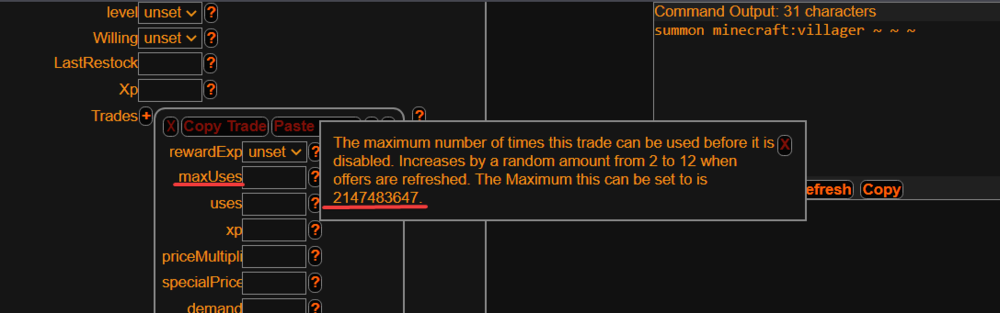
Легче сделать через жителя, установи в NBT-тег maxUses число 2147483647 Вот сайт-генератор: mcstacker.net
- 1 ответ
-
- 1
-

-
У модификатора anchored больше возможностей. Если игрок будет на шифте, то придётся делать дополнительную проверку; а если игрок будет лёжа? anchored эффективней
-
Создаём фаербол с временным тегом tmp summon minecraft:fireball ~ ~ ~ {Tags:["tmp"]} Записываем в тег Owner свой UUID data modify entity @e[type=minecraft:fireball,tag=tmp,limit=1] Owner set from entity @s (@s - игрок) UUID Удаляем временный тег tmp tag @e[type=minecraft:fireball,tag=tmp,limit=1] remove tmp
-
На КБ нормально не получится, через датапаки или плагины
-
mcstacker.net/1.12 - всё что нужно
-
team join blue @a[team=!blue,x=7,dx=0,y=-60,dy=0,z=6,dz=0] Где xyz - это координаты вступления в команду tp @a[(team=команда,x=...,dx=...), но аргументы в селекторе необязательно указывать] x y z
-
team join red @r[team=!blue,team=!red] team join blue @r[team=!blue,team=!red]
-
Вот ответ:
-
data modify entity @e[type=minecraft:item_frame,sort=random,limit=1] Item.id set value "minecraft:stone"
-
Создаём скорборд: scoreboard objectives add bossbar dummy В цикл: execute store result score .max bossbar run bossbar get <id боссбара> max execute store result score .value bossbar run bossbar get <id боссбара> value execute if score .value bossbar >= .max bossbar run say боссбар заполнен
-
Создаёшь скорборд scoreboard objectives add SelectedItemSlot dummy В цикл: execute as @a store result score @s SelectedItemSlot run data get entity @s SelectedItemSlot И всё
-
Используй NBT-тег Fixed:1b
-
Создаём скорборд scoreboard objectives add time dummy В цикл: execute store result score .day time run time query day execute if score .day time matches 55 run say сейчас 55-ый день
-
https://minecraft.fandom.com/wiki/Target_selectors#Selecting_targets_by_coordinate https://minecraft.fandom.com/wiki/Target_selectors#Selecting_targets_by_distance https://minecraft.fandom.com/wiki/Target_selectors#Selecting_targets_by_volume
-
Как применять аргумент distance в селекторе: @e[distance=10] — Target all entities exactly ten blocks away. @e[distance=8..16] — Target all entities more than eight blocks, but less than 16 blocks away (inclusive) Взято с источника: https://minecraft.fandom.com/wiki/Target_selectors#Selecting_targets_by_distance
-
execute at @a run tag @e[type=minecraft:armor_stand,distance=..3] add <tag>
-
execute as @a run title @s actionbar ["","Ваш баланс: ",{"score":{"name":"@s","objective":"money"},"color":"yellow"}] https://youtu.be/0GIKJvFoE-g https://youtu.be/BF4MZHDsLPY
-
Создаём скорборд scoreboard objectives add count_item.stone dummy В цикл: #Записывает количество предметов (minecraft:stone) в скорборд count_item.stone execute as @a store result score @s count_item.stone run clear @s minecraft:stone 0
-
load function scoreboard objectives add move.x dummy scoreboard objectives add move.y dummy scoreboard objectives add move.z dummy scoreboard objectives add move.temp dummy detection function (can be run per tick) # copy self Pos to storage data modify storage util:movement Pos set from entity @s Pos # store storage Pos into temp scoreboard execute store result score $temp.x move.temp run data get storage util:movement Pos[0] 1000 execute store result score $temp.y move.temp run data get storage util:movement Pos[1] 1000 execute store result score $temp.z move.temp run data get storage util:movement Pos[2] 1000 # reset 'moved' score holder scoreboard players reset $moved move.temp # compare the players previous position with the temp scores, and set the movement score to 1 if they are not equal execute unless score @s move.x = $temp.x move.temp run scoreboard players set $moved move.temp 1 execute unless score @s move.y = $temp.y move.temp run scoreboard players set $moved move.temp 1 execute unless score @s move.z = $temp.z move.temp run scoreboard players set $moved move.temp 1 # copy the temp scores into the players new pos scores scoreboard players operation @s move.x = $temp.x move.temp scoreboard players operation @s move.y = $temp.y move.temp scoreboard players operation @s move.z = $temp.z move.temp # run these commands if the player has moved execute if score $moved move.temp matches 1 run effect give @s blindness 2 1 true
-
mcstacker.net/1.16.php - всё что тебе надо
-
Нашёл готовый механизм https://discord.com/channels/154777837382008833/157097006500806656/903838241780817920